
Screenshots
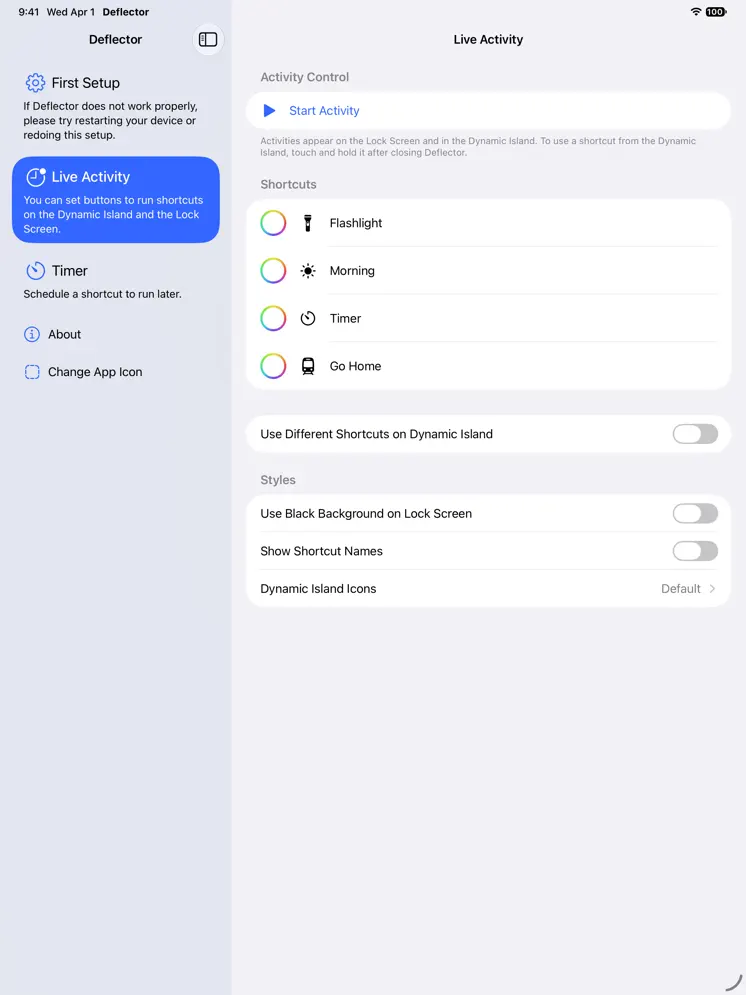
Description
With Deflector, you can add buttons to the Dynamic Island, Lock Screen and Apple Watch to run any shortcut. On supported iPhones in Japan, you can use your preferred voice assistant using shortcuts with the Side Button. To use Deflector, you need to set up an automation in the Shortcuts app. The automation is available within the app.
Release Notes
- Added a timer feature - Schedules a shortcut to run after a specified amount of time - Added shortcuts for timers - Added support for text "Input" when running a shortcut from Apple Watch - To use this, you need to update Deflector Automation to the latest version - You can now choose a "Type" in the shortcut that adds a favorite shortcut - Added caching for shortcuts fetched from your devices - Deflector Automation now prompts you to update when needed - Made some other adjustments
• v1.3All release notes
App Details
| Size | 17.9 MB |
|---|---|
| Initial release | |
| Price | Free |
| Platforms | Apple Watch, iPhone, and iPad |
| Languages | English and Japanese |
| Category | Utilities |
| Compatibility | |
|---|---|
| iPhone | Requires iOS 27.0 or later. |
| iPad | Requires iPadOS 27.0 or later. |
| Mac | Requires macOS 27.0 or later and a Mac with Apple M1 chip or later. |
| Apple Watch | Requires watchOS 26.6 or later. |
Similar Apps
Shortcutie
Additional actions for the Shortcuts app on Mac

JellyCuts
Supercharge your Shortcuts

Shortery - Workflow Automation
Shortcuts, Triggers & Events

Toolbox Pro for Shortcuts
Powerful new automation tools
Double Tap - Remap Shortcuts
Turn shortcuts into double-tap

AI Actions for Shortcuts
AI-powered Shortcuts
App's data is regularly updated.
Last update: